Where creative ideas grow · Building and maintaining websites since 2018, from Rajshahi, Bangladesh

Free tool · nothing stored
Enter a domain to read its live email authentication records, with the faults that cause spam-foldering flagged automatically. Runs entirely in your browser against public DNS — we never see the domain you check.
Lookups run in your browser against Google’s public DNS resolver. We store nothing.
What this checks
SPF
That exactly one record exists, that it is syntactically valid, and whether it ends in ~all or the weaker +all.
DKIM
The common selectors used by Google Workspace, Microsoft 365, Zoho and cPanel, since DKIM selectors cannot be enumerated from DNS.
DMARC
That a policy exists, and whether it is actually enforcing (quarantine / reject) or just monitoring.
This SPF checker reads the three email authentication records a domain publishes — SPF, DKIM and DMARC — and tells you in plain language what is wrong and what to change. It queries public DNS directly from your browser, so the result is always the live record, not a cached copy.
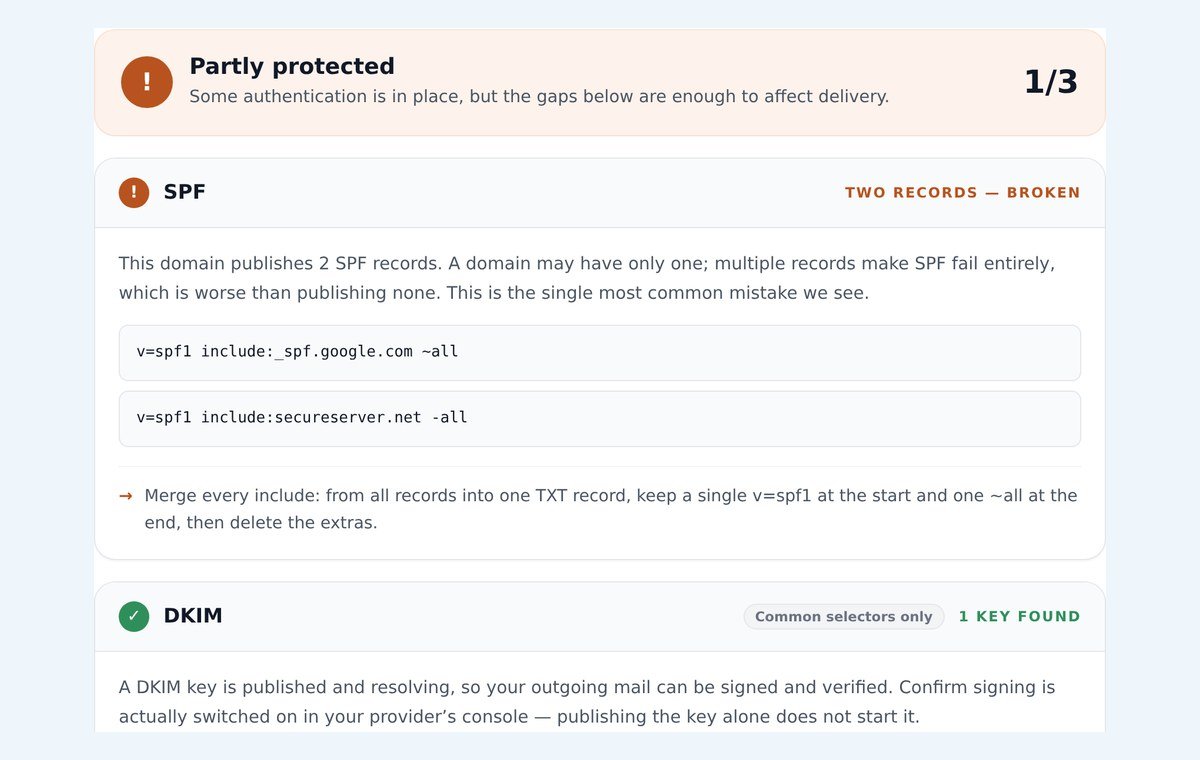
When you enter a domain, three lookups run:
v=spf1._dmarc.yourdomain.com.Nothing is sent to our server and nothing is stored. If the public resolver cannot be reached, the checker says so instead of reporting a record as missing.
Missing means no record starts with v=spf1, so receivers cannot tell your mail from a forgery. Two records — broken is the most common fault we see: a domain may publish only one SPF record, and two make SPF fail for every message. Needs attention covers a record ending in +all, one with no all at the end, or one that makes more than ten DNS lookups.
A key found means your provider can sign outgoing mail — but signing still has to be switched on in the provider’s console. None found usually means DKIM was never set up. An unusual custom selector would not be detected, which is why the card is marked “Common selectors only”.
p=none only monitors, so failing mail is still delivered. p=quarantine and p=reject enforce. Without a rua= address you receive no reports, so you cannot see who is sending as your domain.
A typical record looks like this:
v=spf1 include:_spf.google.com include:sendgrid.net ~all
v=spf1 marks the TXT record as SPF. Exactly one record per domain may start with it.include: authorises another provider’s servers — one include per service that sends mail as you, such as your mailbox provider, a newsletter tool or a helpdesk.~all tells receivers to treat everyone else as suspicious. -all rejects them outright; +all allows the whole internet and should never be used.Every include:, a, mx, exists and redirect costs a DNS lookup, and SPF allows ten. The SPF checker counts them for you, because a record over the limit fails just as if it did not exist.
Every fault above comes down to a few DNS edits at the company that hosts your DNS, plus one switch in your mail provider. Our step-by-step guides cover every common registrar and mail provider pairing, with the exact field names each DNS panel uses — start with Namecheap + Google Workspace if that is your setup.
The rules come from the published standards: SPF (RFC 7208), DKIM (RFC 6376) and DMARC (RFC 7489).
Yes. There is no signup and no limit, and the domain you check is never sent to us.
Most often because of DNS caching. This tool asks Google’s public resolver for the live record; a checker that caches results can show an older version for hours after you change something.
Once the record’s TTL has passed — usually 5 to 60 minutes if you lowered it before making the change, up to four hours if you left a registrar’s default.
Step-by-step guides
Registrar-specific instructions for your exact DNS panel and mail provider.
Browse guides →Namecheap + Google Workspace
Our most-read guide, including the duplicate-SPF trap.
Read the guide →Have us do it — $49
Same day, with a passing test as proof. Money back if we cannot fix it.
Start now →Free 15-minute consultation
Tell us what you need built or fixed. You get an approach, a timeline and a fixed price — usually within a few hours.
Welcome back! Sign in to your account.
Don't have an account?
Create your Mahatosoft client account.
Already have an account?